Run AI on the Edge with Ameba

NPU-accelerated | Multi-framework | Online & offline tools

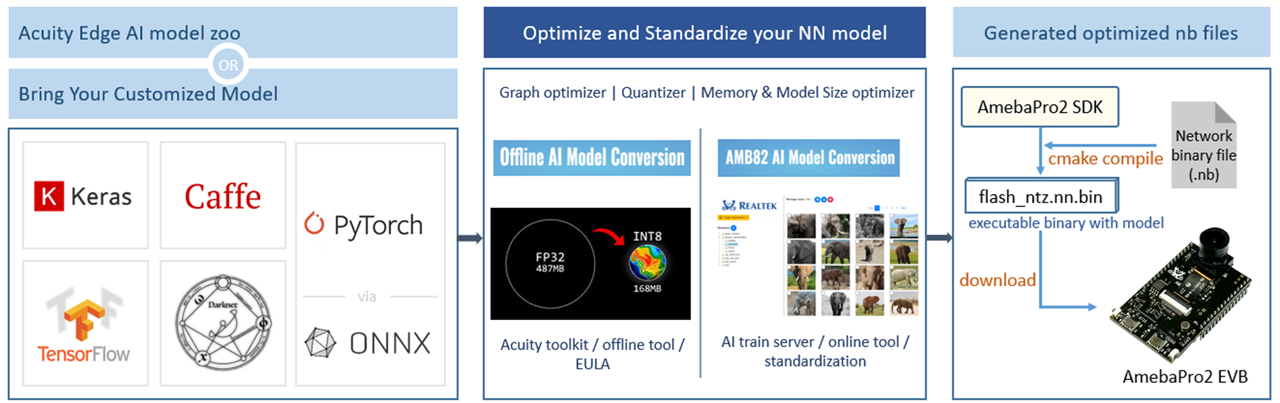
Ameba AI is a comprehensive artificial intelligence (AI) solution designed for Realtek AmebaAIoT SoC. It provides developers with powerful tools and libraries to implement AI functionalities in their applications. With the help of the NN hardware engine to accelerate the inference process, SoCs support a wide range of AI applications, including audio classification, object detection, and more. It is optimized for performance and efficiency, allowing developers to run NN models on resource-constrained devices without compromising on functionality. Whether you are a beginner or an experienced AI developer, Ameba AI provides the tools and resources you need to bring your AI projects to life. The NN deployment on SoC can be achieved through the following steps:

  1. Model Training: Choose a suitable NN model based on the specific AI application you want to implement. Train the model using a compatible framework such as TensorFlow or PyTorch. Ensure that the model is optimized for deployment on resource-constrained devices.
  2. Model Conversion: Convert the trained model into a network binary graph file that is compatible with the NN hardware engine on the SoC. This may involve quantization or other optimization techniques to reduce the model size and improve inference speed.
  3. Model Deployment: Deploy the converted model onto the SoC using the SDK. This involves integrating the model into your application and configuring it for deployment.
  4. Inference Execution: Run the inference process on the SoC using the deployed model. This involves feeding input data into the model and retrieving the output results. The NN hardware engine will accelerate the inference process, allowing for real-time AI applications.
  5. Performance Optimization: Monitor the performance of the deployed model and optimize it as needed. This may involve fine-tuning the model, adjusting the input data, or optimizing the inference process to achieve better results.

By following these steps, developers can successfully deploy NN models on Realtek AmebaAIoT SoC and create intelligent applications that leverage the power of AI.

NN Workflow

AmebaPro2 integrates a dedicated NPU (Neural Processing Unit) that delivers up to ~0.4 TOPS at INT8 precision to accelerate deep neural network inference at the edge.

🔹 Neural Network (NN) Workflow

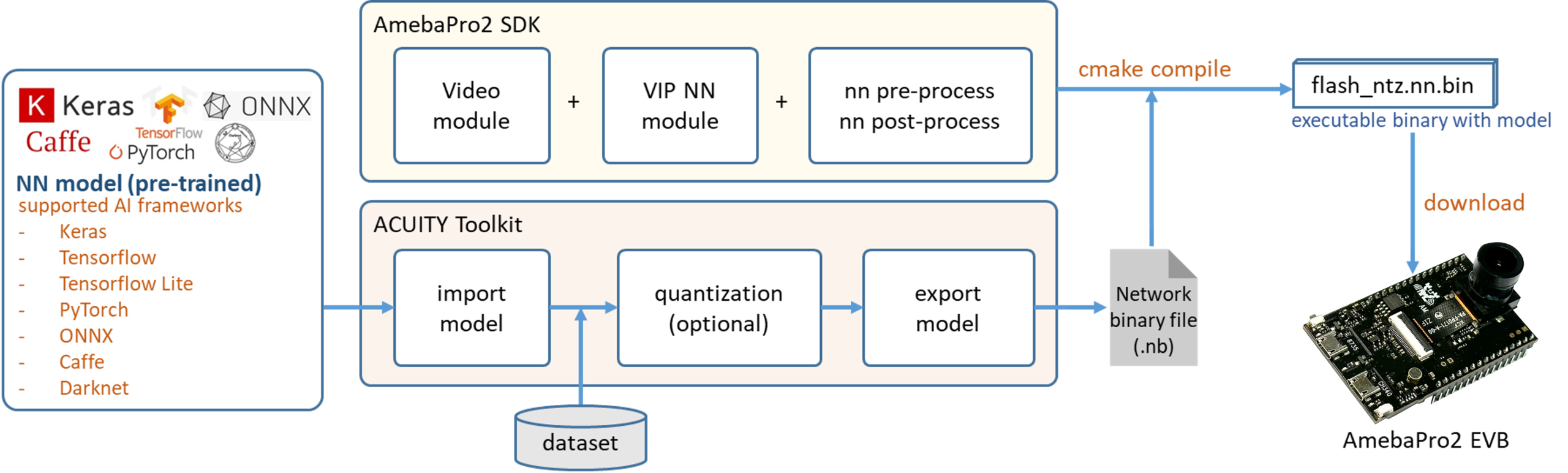
The NN workflow begins with model conversion using the Acuity Toolkit.

  • Supported Frameworks: Transforms pre-trained models from popular frameworks such as TensorFlow, PyTorch, ONNX, Caffe, Keras, and Darknet.
  • Output Format: Converts models into an optimized .nb (network binary) file.
  • Quantization Support: Includes support for INT8, INT16 (DFP), and FP16 quantization.

🔹 Runtime Processing

At runtime, the vipnn MMFv2 module executes the following steps: 

  • 1️⃣ Image Capture: Captures RGB video frames from the ISP camera pipeline.
  • 2️⃣ Pre-processing: Performs image resizing and format conversion.
  • 3️⃣ NPU Inference: Feeds the tensor data to the NPU for inference via the VIPLite driver.
  • 4️⃣ Post-processing: Runs model-specific post-processing (e.g., bounding box decoding, NMS) to produce structured detection or classification results.

🔹 Modular Architecture Advantages

The modular architecture offers high flexibility and security, supporting the following features:

  • ✅ Plug-and-play model integration
  • ✅ Zero-copy buffer optimization
  • ✅ Cascaded multi-model pipelines
  • 🔒 Optional Model Security: Includes Ed25519 signature verification and AES-CBC encryption.

Model Conversion Tools ⚙️

  1. Online Model Conversion
    • Supported models: YOLOv3/4/7-tiny, SCRFD, MobileFaceNet, YAMNet, CNN Gray/RGB
  2. Offline Model Conversion

Documentation 📖

Application Examples 📋

Customized Model Installation Guide

Object Detection

Face Detection

Face Recognition

Audio Classification

Image Classification

Hand Gesture Detection

Online Generative AI

AI Training Guideline 💻

Please confirm that QQ communication software is installed
